Canon Powershot G10 Firmware Updated


Canon has updated the Powershot G10 firmware to a newer version 1.0.2.0.

This addresses the Phenomenon:

If RAW images are captured by continuous shooting under the ISO 1600 setting, abnormal data is recorded and a magenta cast appears in the second and subsequent RAW images. This phenomenon also occurs in the second and subsequent recorded RAW images captured by single shooting, but only if the LCD monitor display mode is set to the OFF position.

This phenomenon cannot be confirmed when images are played back on the camera's LCD monitor. It can only be confirmed if image processing software (such as the Digital Photo Professional software bundled with the product) is used to develop RAW images on a PC.

Read the full article for more about this, what cameras are affected and where to download it from.

The following content is to help you update the firmware by yourself. If errors occur when performing the firmware update, there are instances where the camera cannot be started; therefore, please read the precautionary notes carefully before starting the firmware update.

In addition, this firmware update can also be performed at our service centers. If you wish to have us perform the firmware updates, please contact our service centers.

Firmware Update (Version 1.0.2.0)

This firmware update corrects the following phenomenon.

Phenomenon:

If RAW images are captured by continuous shooting under the ISO 1600 setting, abnormal data is recorded and a magenta cast appears in the second and subsequent RAW images. This phenomenon also occurs in the second and subsequent recorded RAW images captured by single shooting, but only if the LCD monitor display mode is set to the OFF position.

This phenomenon cannot be confirmed when images are played back on the camera's LCD monitor. It can only be confirmed if image processing software (such as the Digital Photo Professional software bundled with the product) is used to develop RAW images on a PC.

Note

* Images that have the magenta cast phenomenon cannot be fixed.
* The phenomenon only appears in RAW images, and does not appear in JPEG images or images appearing on the LCD monitor display.
* The phenomenon only occurs if the ISO Speed Dial is set to ISO 1600 manually, and does not occur if the ISO speed is set to other values (such as ISO AUTO or ISO HI).

Identifying Affected Cameras for the Update

Please check the serial number on the bottom of the camera.

Serial numbers

Products whose fifth digit from the left is 0 or 1 are affected.

****0*****
****1*****


Among products with the serial numbers described above, if there is a marking inside the battery cover like the one in the image below, the issue has already been corrected by correction firmware, and you may continue to use your camera as is with no further action required.

Marking Position

In addition, products whose fifth digit from the left is 2 or above are already equipped with correction firmware; therefore, this phenomenon does not apply.


Items Required for Firmware Update

The following items are required for this firmware update.
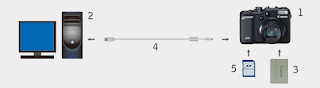

1 - PowerShot G10 Camera
2 - Computer* (USB interface required)
3 - Battery (Bundled with the camera)
4 - USB Interface Cable (Bundled with the camera)
5 - Memory Card (Commercially available SD memory card with a capacity of at least 8 MB)
6 - Firmware Update Data (Can be downloaded if the camera is determined as affected after the serial number is entered).
7 - Firmware Update Procedure (PDF) (Can be Downloaded)

* OS installed on the computer: Windows® XP/ Windows VistaTM, Mac OS X (v10.4-10.5)

Customers who do not have any of the items 2 to 5 are asked to contact Canon service centers.

Outline of the Firmware Update Procedures

To update the firmware, the following procedures are required.

1. Downloading and extracting the firmware update data
2. Preparing the memory card for the firmware update
3. Updating the firmware
4. Confirming the completion of firmware update

In addition, details of the procedures above are covered by the Firmware Update Procedure (PDF). Read the Firmware Update Procedure (PDF) carefully before updating the firmware.

GO TO DOWNLOAD PAGE
(You will need to enter your serial)


Final notes:

You have to pay attention to the way the firmware is uploaded to the camera. Canon with the Powershot G10 model decided to change the way firmware were updated.
So now instead of copying the file directly to the card you will have to connect the computer (PC or MAC) and the camera with the supplied USB cable and use the software to copy the firmware update file to the card on the camera (make sure you formatted the card first).

Then you will have to start the camera on preview mode and choose the firmware update menu item (you cannot have the lens extended or this menu item will not show up).

Just made mine today with no problems and my camera was one of the affected but I've never saw or identified this Phenomenon. But if Canon says it's to update then it's time.

I was hopping to see some improvements on video (GIVES US BACK the 1024 of the G9!!!) or maybe the reappearance of time lapse feature but nothing... this simply corrects what it's mentioned here.

Maybe we will all have better luck next time who knows...

Tip: Interview with Copyright Attorney Ed Greenberg

This great video came into my attention and I think it's worth while and spare some of your time to watch it full.

Just click on the image below to take you to the PhotoshopUserTv video and watch this great Interview with Ed Greenberg conducted by Scott Kelby.

It's a must in copyright advices.

Canon 5D MarkII - The Grip Errors

Canon 5D MarkII Error 80 (Crop)
Well it's TRUE!!!

Canon has done it again. A brand new camera with lots of great features but again errors are arising from it.


I thought carefully if I could put my mouth to the world, about this, or wait until a couple of rumors started to arise on the web.

After a lot of thinking I decided to release this info to all you people that purchase the new Canon 5D MarkII or are planning on buying it in a couple of days, weeks or months.

This is nothing that I was not expecting after I received the BG-E6 and looking at it carefully.

It has the same connections problems has previous models and it continues to be very fragile. (Canon you are so mean after all this years you did not have time to replace this series with a better grip, shame on you guys!!!)

Maybe you will never experience this problems, maybe you will start to experience them as soon as you got the grip... well you all know that technology is a f... s... sometimes it comes perfect while some other times it simply sucks no mater what you do the faulty ones need to be replaced.

Canon 5D MarkII Error 80

This error 80 is one of the main errors that the 5D MarkII gives me almost all the time.

Here is the Camera combo I normally use when these errors occurred:

- Firmware 1.0.7
- Canon 5D MarkII
- Grip BG-E6
- 2 Canon Batteries LP-E6 (On the Grip)
- EF 24-70 L USM
- EF 70-200 L IS USM
- CF Cards Sandisk Extreme III, IV and Ducati (4Gb and 8Gb)
- 580EX

Canon 5D MarkII with Grip is worst than Windows Vista!!

Then on another assignment while using the 24-70 L with 580EX flash and grip on the vertical position the Error 02 appeared, after 30 frame shots, apparently from nowhere and it caused the camera to stop working.

After removing both batteries and unscrew and screw back on the lens the camera started to work normally but the card warning came again saying that the card was not formatted and if I wanted to format it.

I kept the card for later inspection and worked with another one. After arriving home and analyzed the card I noticed that all the 30 pictures take were gone. I had to use Sandisk RescuePro to get those pictures back from the card. UFFF, assignment saved!!!!

I also got a strange "Card Full" information when I had only taken 20 pictures and the camera had always the red light on. I found that strange since I was certain that I had formatted the card before starting the assignment, but you never know... maybe it was my fault so I removed the card after the red light turns off and decided to keep the card and see what the problem could be afterward in the computer.

You will not believe this... the ,card had 4 folders the normal MISC and 3 DCIM more. When inspected the each of the DCIM folders I found that the camera had created 3 more identical folder with the same the same 20 pictures I took copied endless times untill the card was full :)

So the camera got this copy/paste issue and copied all the pictures to those folders until the card was full and this happened with no grip attached.

Please Canon send us a firmware to correct this ASAP!!!

Canon 5D MarkII error 70

Another error that's been giving a couple of times and while shooting with 1/30 or 1/20 speeds is the Error 70.

Canon 5D MarkII Batteries levels

Here is a page with some of the "normal" Canon errors ;)

I finally figured out what the problem is.

After a group investigation with some of other fellow photographers, here in Portugal, that have the same camera but not use the grip or not have the double batteries, I concluded that the problem is the grip with 2 batteries.

When the batteries start to become empty like the above image it seems that the grip looses it's power and start giving failure messages. It cannot process the images or have a failure to the drive because it lacks power to function properly.

I contacted Canon Portugal an they do not even know what's going on with this. No one has reported this so far and since the replacement batteries are now available at the moment and people are using Alkaline batteries on the grip they do not have received any reports from this errors.

Not happy with the Portuguese reply I decided to write to Canon Europe Headquarters (Germany) and send them the above pictures to support my complain.

I received a reply 2 days later saying that they are aware of this situation and that a couple of grips were released with defect and they will send me a replacement one in a couple of days so I can test it out.

It's impossible for me know which serials are affected since the grip apparently do not have serial number on it but I will try to check with Canon and report it here as soon as I got some more good news.

Meanwhile if you get any of these errors please report them immediately to your Canon supplier in order to have them replaced at no cost.


Here is the table of the Error Codes for the 5D MarkII as stated on page 209 of the Instructions Manual.

I do blame Canon for this happenings and for letting us, the consumers, be their Beta testers.

Remember when they release the 1D MarkIII flop with it's super fast shutter speed but with lot's of problems and issues with the mirror and auto focus performance.

And if you do not know what I'm talking about just check the Rob Galbraith extensive review on this issue.

With this Canon has lost part of the share market to Nikon and it looks like they do not even care or worry about it because technology its first than photography and photographers.

While Nikon, on the other hand, they improved their infrared flash system, improved the flashes and released 3 cameras that beat out of the Canon arsenal and also made great improvements on their lenses.

Canon on the other hand gave us the 1D MarkIII flop and now with the 5D MarkII, stated as a video recorder that you could control its functions, turns out that you do not have control over the video mode and the most important one is the faulty grip BG-E6.

If you can remember well this has also happened a couple years ago when they released the Canon EOS 20D with it's also faulty grip that I also complained and send back, a couple of them, before I move to the 1D series.

From everyday that passes I noticed that Canon has a more commercial approach to the market than making things happen to photographers, they always want to be ahead of technology and introduce more new things but forget about improving the ones they already have, I mean the old ST-E2 for example.

This could mean an advantage over the other manufacturers ... just imagine Canon could introduce on their flash system something like the Radio Popper to control their flashes and also improve the 580EXII with a more powerful and better balanced one something in the range of the Nikon SB-900?

They could improve the sharpness of the 100-400mm by releasing a new one and while talking about lens why not a 12-24 L USM (Nikon has it so don't come saying that it will be impossible) and a replacement for the bulky 24-70 L USM lighter and with better overall sharpness or replace it for a 24-85 2.8 L USM IS ?

Turn their heads toward the photographers instead of just releasing new things that most of the people would not use them anyway.

So what would you like to have on the new cameras and flashes systems and why?

Write your suggestions maybe Canon guys would read this and could give us what we really asked for ;)


Tip: Easy, Tilt-Shift Your Photos Online

At the beginning of the month I brought you one cool application so that you can transform your regular photos into some old Polaroid, if you missed the Tip article do not miss it at "Tip: Instantly Create a Polaroid Look".

This got such a huge review from all of you that I decided add another cool one so you can give your photos a different look.

While the Polaroid needed to download software this one "Tilt-Shift" do not.

You just have to import the photo you would like to create the effect and voilá it's done in seconds, although you can always make the same effect in Photoshop this turns out to be a very practical online tool.

Follow me...

You may ask yourself what that heck is Tilt-Shift pictures?

Well, the phrase "tilt-shift" describes a photographic technique that is used to create special effects when taking a photo.

A type of camera lens that can be moved (shifted) and pointed at different angles (tilted) is used.

This can have the effect of changing the focus of the picture in unusual ways.

Read more in here.

Still curious?? Take a look at the definition in Wikipedia.

Here is a cool example I did with one of my pictures.
Before:
Boats in the Sand
After:
Boats in the Sand_Online_Tiltshift

How to make your Tilt-Shift:


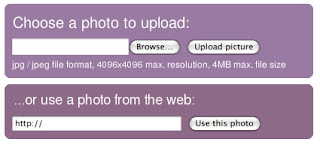
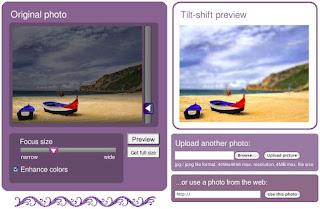
- On the main page of the Tilt-shift maker online software upload your photo via browse method or if you have one on a web page you can import it too.


- Move the vertical slider on the right of the original photo to select the area in focus.

- Use the "Preview" button to see the results then "Get full size" when done, to get a link to the full size image. Creating and downloading the full size image may take a while, depending on original photo size and other factors.

Note: The Preview is meant as a low quality version only - it's better to download the full size image and resizing it down if you want a small version of the picture.

- The size of the area in focus can be adjusted using the horizontal slider, from "narrow" (a small area in focus) to "wide" (a larger area in focus).

Hints and Tips:

- Tilt-shift miniatures often look better with vivid colors. Some photos may have already had their colors adjusted though. In this case, the "Enhance colors" checkbox can be unchecked to avoid over-enhancement of the image.

- Does part of the picture look good but the rest of it is not so great? Consider saving the picture full-size and then select and copy/paste out the best area as a new image.

The name of the page is TiltShift Maker go check it out.

If you made some great Tilt-Shift picture you are invited to send them to the Flickr web page where you can also look at lots of other examples on what you can accomplish with this effect.

Enjoy.