Tip: Why Shoot Raw?

Many of you been asking on what format I'm taking my pictures and the answer is very simple.

I use only RAW format, well maybe sometimes Raw+Jpg when I need fast delivery on the images, otherwise I use only RAW format.

It gives me the possibility of having more control over your images without having degradation while save it over and over and over.

I found this video by hadto titled "Generation Loss" that shows exactly what I'm talking about.

Keep reading for video...


You take a normal JPG image from your files and open the last saved jpeg image, then you Save it as a new JPG/Jpeg image with slightly more compression and repeat the process 600 times and this is what you will get.

Watch the video

Generation Loss from hadto on Vimeo.

And you what are you shooting Raw or Jpg?... why so?

FREE?, Something to Think About

This video of Harlan Ellison "Pay the Writer" it applies also to photographers.

How do you feel about this? Did it ever happen to you and what did you do?

What do you feel about the Coldplay contracts signed prior the bad's show?

Take a look at the article about this here.

Share your comments...

Adobe Photoshop Lightroom 2.3 and Camera Raw 5.3 Final


Lightroom 2.3 and Camera Raw 5.3 have graduated from Adobe Labs and are now available as final releases on Adobe.com.(UPDATE: Use this link to download the new language versions of Lightroom ) These updates include camera support for the following models:(Previously provided in the release candidates of these updates)

* Nikon D3X
* Olympus E-30

This update also includes preliminary support for the recently announced Epson R-D1x (and R-D1xG).

The Lightroom 2.3 update includes several bug fixes.

FIXES originally provided in the Lightroom 2.3 Release Candidate

* In the Windows 64-bit version of Lightroom an sFTP upload process could cause Lightroom to crash.
* Slideshows could return to the first image randomly during playback.
* A memory leak could cause Lightroom to crash while attempting to process files with local adjustments.
* Canon EOS 5D Mk II sRAW files could process with artifacts in Lightroom 2.2.
* Lightroom 2.2 could cause disc burning to fail for Windows customers.

FIXES new to the final version of Lightroom 2.3

* Attempting to undo(CTRL-Z) a single step in Lightroom 2.2 on Windows could cause a series of previous actions to be undone.

Lightroom 2.3 now provides language support for the following additional languages:
(UPDATE: It indicates a trial version but it's identical to what we're now shipping from the Adobe.com Store for this new version. Since technically these versions didn't exist before there was no place to put them on the Update page.)

* Chinese (Simplified)
* Chinese (Traditional)
* Dutch
* Italian
* Korean
* Portuguese (Brazilian)
* Spanish
* Swedish

Adobe Photoshop Lightroom 2.3 Direct Download Links (Mac - PC)

Adobe Camera Raw 5.3 Direct Download Links (Mac - PC)

Tip: DVD's You Must Have (Part 2)

DVD's You Must Have
After waiting for a few weeks on some mail sent to Mr. Zack Arias concerning the use of some more info and photos from the DVD I got no answer so I decided to publish what I have on both DVD's and try not infringe too much copyrighted information.

This is part 2 of the DVD's You Must Have and if you have missed the first one here is the link to where you can find Part 1. DVD's You Must Have (Part 1)

Just follow me...

I believe that some of the good tools to get your photography skills improved are taking pictures, read lot's of photography books and related, sharing skills with other photographers and DVD's.

Today I bring you another one of my favorite from the collection I already own.

It's called "OneLight Workshop" by photographer Zack Arias.

This DVD caught my attention because of the OneLight concept I was trying to accomplish and quite few people have talked about it in such a deep and detailed way.

But why? - you may ask.

Well simply because I always carry my small portable strobe with me while I'm on assignments and because I wanted to try different photo approaches but lacked the ideas.

I've been following Zack Arias blog for quite some time now and did not hesitate on getting his DVD when it was released.

The Zack blog thing started with his wonderful "White Seamless Tutorial" have you read it? It may change the way you look and create a white seamless picture. Take a peak ;)

For those who do not know MR. Zack Arias here is a small introduction taken from his own blog:

"My name is Zack Arias and I am a full time editorial photographer.

My specialty is niched in press and publicity photography for the music industry. As my music work continues to expand nationally, my studio in Atlanta works within a wider spectrum of the entertainment industry producing headshots and fashion portfolios.

My first run at being a freelance photographer left me heavily in debt and placed my family on the edge of destruction. I came to a place in my career that required me to put the cameras down and take a “job.” After two years of leaving the cameras and selling them off to pay rent and fix beater cars, I was given a chance to come back as a second shooter for a friend of mine who shoots weddings. I took a D100 that he bought me, a 285 flash, an ample amount of faith, and quit my job at Kinkos in October of 2003. I was determined to do things differently this time around..."

You can find his works here:
Music Photography by Zack Arias
Headshots by Used Film Studios
The OneLight Workshop

This 2 DVD pack has a lot of goods inside the card box pack that came on the post.

Here is what I found inside when I open it...

OneLight Workshop DVD_Package

This is the full package :)

Inside the card box package you will find:

- 6 Stickers
- 2 DVD with lots of information
- 1 Black T-Shirt with OneLight Workshop white logo
- 1 music CD from the band Meghan Coffee "Songs to Sail By". For more information about this band you can always check their page in here.
- 1 Instructions Booklet with 18 pages.

OneLight Workshop DVD_Inside

Inside the DVD box package you can find:
A detail of the Booklet with some basic information and more tips.

OneLight Workshop DVD_Booklet

Inside the DVD box package you will find:

- 2 DVD with lots of video information.
- 1 Instruction Booklet to guide you with some basic information and more tips.

On the first DVD Zack shows you how exposure variables work.

How Shutter Speed controls the ambient exposure with pictures to illustrate what he's talking about. Range goes to 250th to 4th with simple and illustrative examples.

Zack talks clearly and it's not those kind of videos where at middle of the lesson you're opening your mouth and tired of what the tutor tries to explain you... remember those boring school days with that lousy teacher?... well this has nothing to do with it, it's the complete opposite.

He also talks about Flash Power and explain how you can get consistent flashes and amount of light with the explanation of 1/1 scale to the 1/128 on your flash and this is full of diagrams and examples so you can see what he's talking about in a simple manner.

Then you will have a talk about aperture controls and ISO and how they will affect your photo shootings.

Next come the gear.

Zack talks about what gear he carries around, flashes and accessories.

Flashes are explained from the simple hot-shoe flash to a more powerful studio flashes. You will get to know how you can assemble the gear and also the ways to trigger your flashes wireless, light modifiers, umbrellas and softboxes.

Back in the studio you start to see how you can apply all the things you have learned so far and this is done with a model.

Zack explains all details on how to start with the client, shoot with small on camera strobe, off-camera and compare them.

You will see the pictures taken during this shooting has he explains what is going on with ISO, Aperture and why he chooses that light or position. You imagine yourself having a personal workshop with Zack.

As the 1st DVD is coming to an end is time to move outside and use the model with softbox and umbrella and compare the differences. Zack, at some point, will be shooting against the sun and some more great techniques that will help you outside.

On disc 2 you will go travel with Zack Arias through his client shootings around several setups and this is more of a follow up DVD with lot's on hands on the job.

You can watch Zack talking while choosing this or that setup or light and follow him on this journey through all his assignments.

He does a great job explaining why he has chosen this or that location, spot, light and sends some great tips.

I think this is a must have DVD. If you do not have what are you waiting for???

You can take a look at this small presentation video from DVD package:


And if you are lucky enough to catch one of his workshops... Man you ARE LUCKY!!!

What are people saying about his workshops:


The DVD Box can be ordered at:
OneLight Workshop web page and check out Zac Arias blog for more tips.

Before you go just take a moment to see this brilliant video made by Zack Arias himself:


For more information here are the direct links to his pages:

Web Page: http://www.zackarias.com/
DVD: http://www.onelightworkshop.com/
Blog: http://www.zarias.com/

THANK YOU MR.ZACK ARIAS for sharing this information with all of us.

Tip: DVD's You Must Have (Part 1)
Tip: DVD's You Must Have (Part 2)

Canon Powershot G10 Firmware Updated


Canon has updated the Powershot G10 firmware to a newer version 1.0.2.0.

This addresses the Phenomenon:

If RAW images are captured by continuous shooting under the ISO 1600 setting, abnormal data is recorded and a magenta cast appears in the second and subsequent RAW images. This phenomenon also occurs in the second and subsequent recorded RAW images captured by single shooting, but only if the LCD monitor display mode is set to the OFF position.

This phenomenon cannot be confirmed when images are played back on the camera's LCD monitor. It can only be confirmed if image processing software (such as the Digital Photo Professional software bundled with the product) is used to develop RAW images on a PC.

Read the full article for more about this, what cameras are affected and where to download it from.

The following content is to help you update the firmware by yourself. If errors occur when performing the firmware update, there are instances where the camera cannot be started; therefore, please read the precautionary notes carefully before starting the firmware update.

In addition, this firmware update can also be performed at our service centers. If you wish to have us perform the firmware updates, please contact our service centers.

Firmware Update (Version 1.0.2.0)

This firmware update corrects the following phenomenon.

Phenomenon:

If RAW images are captured by continuous shooting under the ISO 1600 setting, abnormal data is recorded and a magenta cast appears in the second and subsequent RAW images. This phenomenon also occurs in the second and subsequent recorded RAW images captured by single shooting, but only if the LCD monitor display mode is set to the OFF position.

This phenomenon cannot be confirmed when images are played back on the camera's LCD monitor. It can only be confirmed if image processing software (such as the Digital Photo Professional software bundled with the product) is used to develop RAW images on a PC.

Note

* Images that have the magenta cast phenomenon cannot be fixed.
* The phenomenon only appears in RAW images, and does not appear in JPEG images or images appearing on the LCD monitor display.
* The phenomenon only occurs if the ISO Speed Dial is set to ISO 1600 manually, and does not occur if the ISO speed is set to other values (such as ISO AUTO or ISO HI).

Identifying Affected Cameras for the Update

Please check the serial number on the bottom of the camera.

Serial numbers

Products whose fifth digit from the left is 0 or 1 are affected.

****0*****
****1*****


Among products with the serial numbers described above, if there is a marking inside the battery cover like the one in the image below, the issue has already been corrected by correction firmware, and you may continue to use your camera as is with no further action required.

Marking Position

In addition, products whose fifth digit from the left is 2 or above are already equipped with correction firmware; therefore, this phenomenon does not apply.


Items Required for Firmware Update

The following items are required for this firmware update.
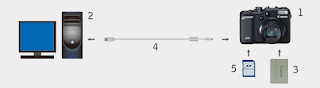

1 - PowerShot G10 Camera
2 - Computer* (USB interface required)
3 - Battery (Bundled with the camera)
4 - USB Interface Cable (Bundled with the camera)
5 - Memory Card (Commercially available SD memory card with a capacity of at least 8 MB)
6 - Firmware Update Data (Can be downloaded if the camera is determined as affected after the serial number is entered).
7 - Firmware Update Procedure (PDF) (Can be Downloaded)

* OS installed on the computer: Windows® XP/ Windows VistaTM, Mac OS X (v10.4-10.5)

Customers who do not have any of the items 2 to 5 are asked to contact Canon service centers.

Outline of the Firmware Update Procedures

To update the firmware, the following procedures are required.

1. Downloading and extracting the firmware update data
2. Preparing the memory card for the firmware update
3. Updating the firmware
4. Confirming the completion of firmware update

In addition, details of the procedures above are covered by the Firmware Update Procedure (PDF). Read the Firmware Update Procedure (PDF) carefully before updating the firmware.

GO TO DOWNLOAD PAGE
(You will need to enter your serial)


Final notes:

You have to pay attention to the way the firmware is uploaded to the camera. Canon with the Powershot G10 model decided to change the way firmware were updated.
So now instead of copying the file directly to the card you will have to connect the computer (PC or MAC) and the camera with the supplied USB cable and use the software to copy the firmware update file to the card on the camera (make sure you formatted the card first).

Then you will have to start the camera on preview mode and choose the firmware update menu item (you cannot have the lens extended or this menu item will not show up).

Just made mine today with no problems and my camera was one of the affected but I've never saw or identified this Phenomenon. But if Canon says it's to update then it's time.

I was hopping to see some improvements on video (GIVES US BACK the 1024 of the G9!!!) or maybe the reappearance of time lapse feature but nothing... this simply corrects what it's mentioned here.

Maybe we will all have better luck next time who knows...